Transliteration Gets an Upgrade

Today we’re happy to expand our set of supported languages for the transliteration feature, that converts Roman characters into the corresponding alphabet of your choice. The nine newly-added languages brings the total to fourteen supported languages: Amharic, Arabic, Bengali, Greek, Persian, Gujarati, Kannada, Hindi, Malayalam, Marathi, Nepali, Punjabi, Russian, Sanskrit, Serbian, Tamil, Telugu, Tigrinya, and Urdu.


To enable this feature, go to the Settings | Basics tab, select Enable for the transliteration option, and select your preferred language. The new language offerings will only be available on the new post editor, so make sure you upgrade to access the full set. This setting will affect all blogs on your account, similar to the Compose Mode setting. 

For more detailed information, please take a look at out transliteration article in our Help Center.

Introducing Blogger Android App

Have you ever wanted to write up a quick blog post on the go? Now there is an easy way to do this on your Android phone! We are excited to announce our first version of the Blogger Android App. Using the app you can easily compose a post, attach a photo that you just took with your phone, and either save it as a local draft for later or immediately publish it to your blog. If you are an Android user, you can start using the Blogger app today by downloading it for free from the Android Market.


Feature highlights
  • Multiple accounts and blogs: You can easily switch between different accounts and blogs that you have author rights to. Simply choose your account and blog and you are all set to go.
  • Write and save/publish: You can write a post, assign labels, and then either save it as a draft or immediately publish it. Saving as draft is handy if you need to wait until you have Internet connectivity.
  • Photos from camera and gallery: If you see something interesting, you can take a photo directly from the app and include it in the blog post. You can also browse your gallery to include the ones you like.
  • Sharing to Blogger from gallery or browser: Blogger is one of the available sharing options. If you come across a photo in the gallery, or a website while browsing, you can share the content to the Blogger app directly from the sharing menu.
  • Share location: You can share your location by activating the location bar and selecting the correct location. This information will be included in your post.
  • View saved/published posts: By switching to the List View, you can view all your drafts and published posts that you wrote using the app. By performing a long-press on a published post you can invoke a menu that includes the option to view your post in a browser.
We hope you enjoy the app. As always, we would love to hear what you think so please feel free to share your thoughts with us through our feedback form. (Note: this app is available only on Android devices but we are working toward supporting other smartphone platforms to allow more of our users to easily post to Blogger on the go.)

The Quick Brown Fox

A couple of months back we introduced Web Fonts to Blogger in Draft. Today we’re excited to not only launch Web Fonts to ALL Blogger users, but also announce we’ve added an additional 35 fonts to the mix, for a grand total of 77 fonts!

Henry Ford once said “Any customer can have a car painted any colour that he wants so long as it’s black.” When it comes to the Internet and fonts, sometimes this hits pretty close to home: “You can use any font you want so long as it’s Arial.” With the introduction of Web Fonts, this is now a far cry from the truth!

Web Fonts, brought to you by our good friends at Google Fonts, let you spice up and further personalize your blog. Just have a look at what we’ve done with the post titles of this blog! And for those of you interested in fonts for non-latin alphabets such as Cyrillic, Greek and Khmer, we have those too!


Ready to give it a try for yourself? Simply go into the Advanced tab of the Blogger Template Designer for your blog, select the type of text you’d like to change (Post Title, Blog Title, etc.) and click on any of the new Web Fonts for a preview. Don’t worry, nothing will change on your blog until you select “Apply to Blog”, and this means you can play around with all of the fonts and only make the switch when you’re ready.


For the full list of fonts and more information, please take a look at the Web Fonts page in our Help Center.

Go ahead. Jump over that lazy dog!

2010: Looking Back

2010 has been an exciting year for all of us on the global Blogger team, and our platform is now more powerful, reliable, and active than ever before. As we close the books on another great year, we want to take a moment to look back at some of the highlights.

The makeover. The new Template Designer, with beautiful new templates and iStockPhoto™ background images, was one of the team’s biggest accomplishments of the year. Since the launch in June, nearly half of our active users have begun using the new templates (if you haven't tried our new templates yet, why don't you give them a try?) Our efforts to make Blogger blogs look more beautiful continued with the release of web fonts, custom background images, and mobile-optimized views.

Some great new features. 2010 was also a year when we added tons of new features to Blogger. We had a busy summer adding two new admin tabs to Blogger: Comments and Stats. The comments tab introduced a comments inbox and spam filtering; real-time stats, followed by stats gadgets, were also highly requested features. We've also added static pages, new share buttons, WYSIWYG post preview, improved YouTube integration, Zemanta post editor gadget, integration with Google Apps, and many other new features.

Rock-solid infrastructure. Of course features don't mean much when the service goes down, and we've made lots of behind-the-scene improvements to keep our service up and running as reliably as possible. Auto-pagination was one of our many efforts to reduce latency. Sometimes keeping our infrastructure robust meant phasing out features that are used by only a fraction of our users, but have a heavy impact on our system, such as FTP publishing — which some bloggers called a "hard but smart decision."

Reaching out to real users. Perhaps the most exciting thing that we did this year was to get out more and meet the real users, like you. We set up booths at SXSW and BlogWorld Expo (our first ever presence there), and we held our 11th birthday party all around the world. In addition, our face-to-face meetings were accompanied by our conversations with you over virtual channels like our user forum and Twitter. We will continue meeting you, listening to you, and delivering what you want for Blogger in 2011.

It’s been a pretty busy year for us, but we hope 2011 will be an even busier year where we deliver even more exciting releases to you. Thanks again for all your support, and we wish you the best during this holiday season. See you in the new year!

Take a Survey, Win a Blogger shirt, Be Fashionable

Our ears are always open to your feedback, whether it's a request for a new feature you'd like to see, a suggested improvement to the latest release from Draft, or input during a usability study.

In that spirit, we're hoping that you'll once again help us out us by taking a quick survey about our existing monetization features. And to make it a little more fun, we'll be sending out a handful of shiny new Blogger T-shirts to a lucky bunch of survey-filler-outers (chosen at random of course!).

Thanks for the help in advance! And for those who don't win a shirt, keep an eye out for other ways to get your hands on one in the future.

blogger Dubbed the Most Reliable Blogging Service on the Web

‘Tis the season to be jolly, and we certainly have reason to celebrate after the folks at Royal Pingdom conducted an independent study of blogging services on the Web and found that Blogger was without question the most reliable. In fact, Blogger was the only service of all those tested that delivered 100% uptime. You can read the full article here.

Our favorite quote:
“Since Blogger was the only service with zero downtime overall, we skipped the chart here. We hope you don’t mind. It simply wouldn’t have been very interesting.”
When it comes to reliability, we certainly like being uninteresting!

Discover Your Blog's Community with OneTrueFan

Discover Your Blog's Community with OneTrueFan

This is a guest post by Eric Marcoullier, CEO of OneTrueFan. Though Blogger/Google does not have any affiliation with OneTrueFan, we’ve found OneTrueFan as an interesting way for our users to build community around their blog and get to know their audience, and so asked Eric to introduce OneTrueFan for our users. -- Chang Kim, Product Manager

You work hard to write great content and bring people to your Blogger blog. You've built a great community of loyal readers, many of them reading everything you post. Too bad it's so hard to better know who your readers are: On average, less than one percent of readers comment on an article on the web; Regularly searching Twitter, Digg, or other sites for links to your site is tedious and time consuming.

At the same time, you're likely getting good traffic from search engines and social media sites like Twitter and Facebook. Unfortunately, these readers are incredibly difficult to engage. More than 80% of a site’s traffic visits just one time and reads only one article. Visitors driven by search and social media tend to skim a blog post and then leave. Less than 24 hours later, they can't remember where they read your content, so they'll never come back.

OneTrueFan surfaces the community that exists on and around your Blogger blog, creating a deeper sense of engagement with new and returning users, and helps you get to know the people who visit.


OneTrueFan lives at the bottom of your blog. People show up in two ways: they can check in via OneTrueFan or share a link on Twitter. (In the coming weeks, people will also show up when they share a link with Facebook, Tumblr, Posterous, and many other sites.) You and your readers can mouse over anyone's picture to learn more about them.


Readers earn points for coming to your site each day, reading content, sharing links and driving traffic to your site. The ten readers with the most points show up in a leaderboard, but those points only last for 14 days. Readers need to keep coming back because fanship is an ongoing process.

Now you might be asking yourself, "Why would anyone want to check into my blog?" Because they *love* your blog and want people to know that they are a part of your community. OneTrueFan is an easy way for readers to show you a bit of love without going through a lot of effort.

Getting OneTrueFan on Blogger is free and easy! Just click this link to add OneTrueFan to your Blogger blog. Once it's installed, you'll start discovering your community in no time.

Link: Install OneTrueFan to your Blogger blog

Take Control of Your Site Feed


Feeds are a great way to reach a broader audience and keep your loyal readers up-to-date. In fact, it’s not uncommon for blogs to have more than a quarter of their traffic come from feed readers.

The challenge with feeds is that it’s never been possible to control exactly how much content is delivered. Up until now, the options have been “Short” and “Full”. Short produces a feed that contains around the first 400 characters of the post, with HTML and images removed. Full produces a feed that contains everything in the post, including HTML and images. But what about those instances where you want to give your users a tastean image or two with some introductory textand then have them visit your blog to see the full post? Well today we’ve launched a third option that lets you do just that using Jump Breaks.

To enable this feature, simply go to the Settings page for your blog, click on Site Feed, and then next to “Allow Blog Feeds”, change the drop-down value to “Until Jump Break”.


That’s it! Next time you write a post and use a jump break, anyone reading the feed will get all the content, including images and HTML formatting, up until the jump break (if there’s no jump break, the feed will contain everything). If readers want to see the full post, they can click the “read more” link and they’ll be directed to your blog. This means you have full control over your feed.  For example, want to include an image for your recipe but not the whole recipe? No problem! Put the image and part of the recipe before the jump break, and that’s all the feed readers will see.

Enjoy!

Monetize your site with Google Affiliate Network

Guest post by Google Affiliate Network (GAN)

There are lots of great ways to make money from your blog. One of those ways is to use an affiliate network. Put simply, an affiliate network is a way to promote products from some of your favorite retailers; you get paid when any of those retailers makes a sale based on a promotion you ran on your blog. Our friends at the Google Affiliate Network have a great program and have agreed to make a special offer to our users—so if you haven't heard of GAN already, have a read, and be sure to sign up!

With Google Affiliate Network, you can access affiliate ads for top retailers. If the ad or text link you post on your blog results in a sale, you earn a commission. This means that you can start working with advertisers who will pay you a performance fee for driving a sale or other conversion.
Google Affiliate Network gives you access to a diverse range of affiliate programs for advertisers including Barnes & Noble.com, Red Envelope, Sears, ProFlowers, Abe Books and Puma. Once you have access, you can apply to create advertiser programs, promote ads, search for links to specific products, sign up to access product feeds, and utilize Link Subscriptions that deliver the latest links and promotions directly to you each day.

Google Affiliate Network is featured in the Monetize tab in your Blogger account or you can apply using the link below (please note that you’ll need an AdSense ID to join).

Here’s how to get started:
  1. Sign up for a Google Affiliate Network account with your valid AdSense Publisher ID.
  2. As soon as you're approved for Google Affiliate Network, sign in and apply for advertiser programs.
  3. Follow the instructions to start displaying cost-per-action ads.
Check out our Beginner’s Guide to help you through the process of becoming a successful publisher and continue reading for the answers to our frequently asked questions. Apply before December 13th and take advantage of affiliate exclusive holiday offers from select Google Affiliate Network advertisers. The special offers will be available for Monday, December 13th, from over 20 advertisers including Barnes & Noble.com, Sears, Red Envelope, Arden B and 6ave. For more information, please visit this blog post or apply now with your valid AdSense Publisher ID.

Updates and Fixes for November 22nd

Besides an exciting update
to the Blogger in Draft testing ground, we’ve also made a few updates
to the rest of Blogger. Here’s a quick summary of the latest changes,
hot off the press:


Comment Notifications enabled by default on new blogs

We
think it’s important to stay in touch with the activity on your blog,
so we’ve turned on the comment notification setting by default for all
new bogs. We’ll send an email to the  address associated with your
Blogger account with each new comment from your readers.

Your
old blogs won’t be affected at all, and if you’d like to enable or
disable comment notification at any point, you can easily do so from the
Settings | Comments tab.


Picasa albums created automatically (if needed)

We
hope you are already aware that when you upload an image from Blogger,
it gets added automatically your Picasa Web Albums account in an album
dedicated to your blog. This means that any image you upload from
Blogger will be available to view, edit, and share when you login to Picasa.

Should
you delete the album associated with your blog for any reason, we’ve
made an update which will now create a new album automatically so you
can continue to upload images to Picasa.


Upload Image button added to Edit HTML mode
(Blogger in Draft only)

We
heard lots of feedback recently about how you’d like to be able to
upload an image in the post editor’s Edit HTML mode, so we’ve added it
into the new post editor’s toolbar with today’s release. You’ll see it
right now if you go into the post editor. Hopefully this saves you a few
extra clicks next time you need to add images to your posts.


And lastly, a bug fix

Many
of you let us know via the forum that <img> tags for images
uploaded in the new post editor weren’t closing correctly, which was
causing formatting problems in your post. We’ve corrected that problem
in this release, and now <img> tags are closing as they should.

Thanks for letting us know!

API update blogger

Alongside yesterday's Blogger Beta launch comes some great news for Blogger API developers — Blogger now has a Google Data API! This means:
Please post any questions/problems/etc. to the bloggerDev/Data API discussion list, so we can make sure to fix any bugs as quickly as possible — thanks!

beta blogger

Today we're launching a new version of Blogger in beta! You've been asking for ways to do more with your blog, and you can with this new release. With the beta you can:
Take a look at the tour to see all the new things you can do (well, a lot of the new things ... they didn't all fit in the tour).

As we release this version, we're limiting the number of people who can switch over. (You'll see a link on your Blogger dashboard when you are able to move.) Eventually, of course, everyone will be able to transition their blogs to the new version. Thanks in advance for your patience as we roll it out.

If you can't wait, you can create a new account on the beta now and make a new blog to test out the new features. Because the new Blogger uses Google Accounts, you can use your existing Google login, or create a new one. (Later, you'll be able to merge your current and beta accounts, and have all your blogs in one place.)

We'll be posting more about the new version in the coming days, but for now, we really want to know what you think. You can post on the Blogger Help Group or via or feedback form.

beta blogger

Today we're launching a new version of Blogger in beta! You've been asking for ways to do more with your blog, and you can with this new release. With the beta you can:
Take a look at the tour to see all the new things you can do (well, a lot of the new things ... they didn't all fit in the tour).

As we release this version, we're limiting the number of people who can switch over. (You'll see a link on your Blogger dashboard when you are able to move.) Eventually, of course, everyone will be able to transition their blogs to the new version. Thanks in advance for your patience as we roll it out.

If you can't wait, you can create a new account on the beta now and make a new blog to test out the new features. Because the new Blogger uses Google Accounts, you can use your existing Google login, or create a new one. (Later, you'll be able to merge your current and beta accounts, and have all your blogs in one place.)

We'll be posting more about the new version in the coming days, but for now, we really want to know what you think. You can post on the Blogger Help Group or via or feedback form.

go mobile

A while back we mentioned that we've been working with Sony Ericsson to incorporate blogging into their new generation of cameraphones. Well, the k800 has started to hit the market and our friends in Sweden have a helpful graphic to explain how it all works.

Check it out!

new blogger book

We recently heard from the folks at Mann Publishing that their new Blogger book has been released! Here's what it covers:
"With this book, you will learn how to use Blogger’s Post Editor and Dashboard to create sophisticated postings that include images and hyperlinks, and how to change the look and feel of your blog using templates. Other topics include making money using Google

Blogger Web Comments for Firefox

Ever want to know what bloggers are saying about a web page but been too lazy to do anything more than watch slick animations? You clearly have a fever for which the only cure is Blogger Web Comments, our new extension for Firefox 1.5. Once it’s installed, you can see instant results from Blog Search showing you posts about the page you’re looking at. Plus, there’s a Blogger posting form built in, so you can immediately make a post on your own blog. Glen Murphy has a little story about making the extension in his announcement post on the Google Blog.

You’ll need the new Firefox 1.5 to use this, which makes the three to four minutes directly following your reading of this post the perfect time to try Firefox out, or upgrade if you’re still using Firefox 1.0. Download Firefox from http://www.mozilla.com/firefox/.

There are more nifty things you can install to make Firefox even more useful. There’s the Google Toolbar for Firefox (which includes a BlogThis! button for more Blogger posting possibilities) and the extensions described in the Wired News article, “The Firefox Hacks You Must Have.”

Macworld SF bloggers lunch

Just wanted to remind everybody that the annual MacWorld SF blogger lunch is coming up in a few weeks, so mark your calendars!

Upcoming.org: Macworld SF bloggers lunch and schmoozefest at Yerba Buena Center for the Arts (Tuesday, January 10, 2006)

A group photo from last year:

From the side
(originally uploaded by pinwheel, more here)

Update: Shellen posted a bit about it too.

A Pulitzer for Blogger Buzz?

Not quite, but according to the CBC, online journalists are now eligible for the Pulitzer Prize:
"Internet journalism received a leap in recognition Wednesday as the Pulitzer Prize Board widened its submission guidelines to include online material for all of its journalism categories."

"'The board believes it has taken a significant step in recognition of the widening role of online journalism at newspapers,' prize administrator Sig Gissler said in a statement. Online material will be considered beginning with the 2006 competition (which honours work done in 2005)."
You've still gotta write for a newspaper though:
"The eligibility guidelines 'will continue to be restricted to newspapers published daily, Sunday or at least once a week during the calendar year,' Gissler added, but will be widened to included the online editions of those newspapers."

Blogger Hoddie

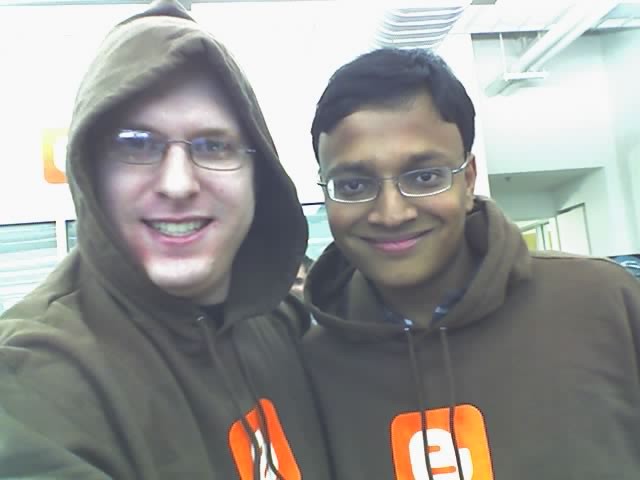
Can you tell it’s a bit of a slow Friday at Blogger? Anyway, here’s Prashant and me being happy and excited in our new Blogger hoodies, which just showed up in a big box of warm fuzziness.

You can be just as rockin’ by getting Blogger gear at the Google Store. When people ask, you can say the B stands for “B’awesome.” It’s a great way to make new friends.

In actual Blogger news, the site’s up, spam’s down, and, as always, we’re working on great new features. So all is right in the b’awesomeosphere.

BlogSpot is Happy Again

You may have noticed a bit of an unplanned outage for Blog*Spot blogs yesterday afternoon. We’re really sorry about this. There was an unlikely problem with some of the Blog*Spot machines that took our engineers and operations folks a few hours of work to track down. In something of a Catch-22, both Buzz and Blogger Status are hosted on Blog*Spot, so we weren’t able to get the word out that things weren’t working properly and that we were fixing them.

We didn’t lose any posts because of this, but if you posted to your blog during the outage, there’s a chance that you’ll need to republish to see the changes. (How do I republish my blog?)

The good news is that, were this to ever happen again, we’d be able to diagnose and fix it in minutes, not hours, now that we’re aware of the potential problem. Also, we’ll be improving our outage indicator so that we’ll be able to communicate about unexpected things like this much more directly in the future.

Again, we apologize. We wanted to read blogs yesterday afternoon, too, so we totally understand any frustration you may have had.

Tips for Increasing Pageviews

Darren Rowse, blogging at ProBlogger, posts 11 tips for increasing pageviews. This is mostly in the context of advertising on blogs (nothing wrong with that: How do I put AdSense on my blog?), but the tips are good even if you don’t sell ads on your blog. After all, if you can get readers to read more of your blog the first time they come, they’re more likely to find something they like and want to come back for more.

I think the best of Darren’s tips are those about linking your posts together: referring to posts you’ve made in the past, writing posts in series, or even just highlighting your best posts in a spot on the sidebar (or at the bottom). You may recall that last tip from Jacob Nielsen’s usability tips for weblogs, something I wrote about a few months back. (See! I’m doing it! Go go Blogger Buzz pageviews!)

Personally, I discourage tip #8, which says to include only summaries in your RSS feeds. I likes me my Google Reader, and get a bit annoyed by sites that only have the summaries instead of full posts. I think it’s better to include other ways to get your feed-reading readers to come to your site, perhaps with the aforementioned intra-blog links, or (ProBlogger tip #10) encouraging community in your comments.

Disclaimer: Pageview tips not effective during Blog*Spot outages.

[via Freshblog]

Recently Updated with less Spam

Because of the improvements we've made over the past several weeks, the amount of spam hosted on Blog*Spot has been significantly reduced. However, some of this improvement may not have been observed by third-party search services who rely on our Recently Updated list.

This week, we've pushed out improvements to this changes file such that we are filtering out suspected spammers. By relying on the updates in our Recently Updated list, other services that index our blogs can now take advantage of the spam classification on which we've been relying.

unreliable narrator

I remember the first time I read Tony Pierce's blog because I'd only been working on Blogger for a short time, and the fact that I hadn't heard of him was pretty bad from a first impressions standpoint.

But my fellow Pyrate (Sutter) tipped me off, and the first post I read was about how the newspaper in Hell is so bad. When I realized that for several weeks Tony had been writing his whole blog from Hell after having been escorted there by the spectre of Kurt Cobain, I was floored. From a "getting what this whole blogging thing can really be" perspective, it was a big moment for me.

Tony's got a new book out called Stiff which collects all of his infernal posts into a choice of awesome covers. I just finished re-reading them this weekend and I couldn't recommend it more highly.

If you can't say something nice ...

As a good number of folks have noted, the cover story of next month's Forbes magazine features an article titled "Attack of the Blogs."

Seeing as how the article is already being picked apart by the web at large for saying things like "Web logs are the prized platform of an online lynch mob," I thought I'd take the opportunity to say a couple nice things about the piece:
  • The article points out that all kinds of blogs are being created each day and in amazing numbers. Of course, this point is made in the very last paragraph, but still. Forbes readers now know, for example, that hundreds of thousands of new blogs are created each day across the web and that this service gets more visitors "than each of the Web sites of the New York Times, USAToday and the Washington Post." Neat!
  • A lot of folks have taken issue with a sidebar to the article that includes tips for how companies can Fight Back against the bloggers. But one of the tips is Start Your Own Blog. A fine idea, really. Lots of companies are already doing this as a way to have an authentic voice on the web and to better connect with their users. It'd be a shame if the thought only seemed appealing as a way of Getting Even ... but whatever it takes.
  • The publication of the article serves as an opporunity to remind everyone of the excellent work done by the fine people at the EFF in putting together their Legal Guide for Bloggers.
And with that I must return to clubbing baby seals so that I might use their skins to publish my slanders.

Spam, APIs and Whitelisting

We've pushed some additional changes this week to make it more difficult for spam to be created using our API and other tools (this includes Hello/Picasa, Flickr, w.bloggar, ecto and many others).

The downside to the API changes is that those users whose blogs have been improperly classified as spammy have been unable to post outside of the blogger.com interface. For these users, we've pushed a change so that posts will be set to draft if created through the API. This way no content will be lost and users can go to blogger.com to solve the CAPTCHA and post their content.

We've also introduced a way for users who have been improperly classified to let us know that their blog is in need of manual review. More information on that can be found in the Help.

blog book deal

Sounds like cooking blog Chocolate & Zucchini just scored a book deal:
"Life changes? Yes, indeed: today seems like the perfect day to announce that I have just signed a book deal with a NYC publisher, that I have quit my dayjob and that I now live the happy life of a full-time writer, working on the book and a miscellany of other projects. Excited, thrilled, gleeful and proud is how I feel -- but most delightful of all, free. There is no price tag on that."
I wonder if she read Biz's essay?

[via Baking Fairy]

spam?

Spam is a tricky problem. Or as Matt Haughey says "spam bloggers sure are resourceful little bastards."

For a while now, the Blogger team has been contending with spam on Blog*Spot through mechanisms like Flag as Objectionable and comment/blog creation CAPTCHAs. The spam classifier that Pal described has also dramatically reduced the amount of spam that folks experience when browsing NextBlog.

However, spam is still being created and, as was widely noted, Blogger was especially targeted this weekend.

One group of folks who are particularly affected by blog spam are those who use blog search services and those who subscribe to feeds of results from those services. When spam goes up, it directly affects the quality of those results. I'm exceedingly sympathetic with these folks because, well, we run one of those services ourselves.

So given that the problems is hard, what more are we doing? One thing we can do is improve the quality of the Recently Updated information we publish.

Recently Updated lists like the one Blogger publishes are used by search services to determine what to crawl and index. A big goal in deploying the filtered NextBlog and Flag as Objectionable was to improve our spam classifiers. As we improve these algorithms, we plan to pass the filtered information along automatically. Just as a first step, we're publishing a list of deleted subdomains that were created this weekend during the spamalanche.

Greg from Blogdigger (one of the folks who consumes blog data) points out that "ultimately the responsibility for providing a quality service rests on the shoulders of the individual services themselves, not Google and/or Blogger." However, we think by sharing what we've learned about spam on Blogger we can hopefully improve the situation for everyone.

We can also make it more difficult for suspected spammers to create content. This includes placing challenges in front of would-be spammers to deter automation.

Of course, false positives are an unavoidable risk with automatic classifiers. And it's important to remember that the majority of content being posted on Blog*Spot is not spam (we know this from the ongoing manual reviews used to train the spam classifier).

Some have suggested that we go a step farther and place CAPTCHA challenges in front of all users before posting. I don't believe this is an acceptable solution.

First off, CAPTCHAs represent a burden for all users (the majority of whom are legit), an impossible barrier for some, and are incompatible with API access to Blogger.

But, most importantly, wrong-doers are already breaking CAPTCHAs on a daily basis. And not through clever algorithmic means but via the old-fashioned human-powered way. We've actually been able to observe when human-powered CAPTCHA solvers come on-line by analyzing our logs. You can even use the timestamps to determine from whence this CAPTCHA-solving originates.

One thing we've learned from Blog Search, is that even if spam were completely solved on Blog*Spot, there would still be a problem. As others have concluded, we've realized that this is going to be an on-going challenge for Blogger, Google and all of us who are interested in making it easier for people to create and share content online.

weblog usability

Jacob Nielsen has a new Alertbox column: Weblog Usability: The Top Ten Design Mistakes. He has some good tips and points worth considering, though issue #4 does conflict with my love of Suck-style linking.

(Also, I take offense to #10. My Geocities website, at TimesSquare #2334, was awesome. It kicked ass. It even got mentioned in an issue of The Duelist. Hell, yeah! The one with Xena on the cover. I bet Jakob Nielsen’s deck sucks, anyway. It probably uses four colors and has no land. Of course, my site isn’t there any more, so I guess Nielsen gets the last laugh. Meh. Don’t worry, though; We don’t get rid of Blogspot blogs, even if you do leave them languishing for years.)

If you want to play along on Blogger, here are some help articles to get you started: Profiles (#1, #2); Create a title for your post (#3); Do more with links (#4); Edit your link list (#5); Vote for feature requests (#6); Create a new blog (#8); What to do if your mom discovers your blog (#9, sorta); Using Blogger to FTP (#10, also known as Robb’s Law).

Blogging in the Early Republic

Indeed, blogging demonstrates the persistence of a key truth in the history of reading … that readers, in a culture of abundant reading material, regularly seek out other readers, either by becoming writers themselves or by sharing their records of reading with others.
There have been a ton of comparisons made between bloggers and pamphleteers like Thomas Paine, but an article from Common-Place.org argues that the better historical anology is to “journalizing,” a practice of journal writing and sharing that developed after the proliferation of newspapers in antebellum America.
Surrounded by ephemeral print, many began to make references in their journals to what they had been reading—the rough equivalent of what bloggers do by linking to a Web page. During the Revolution, for instance, Christopher Marshall, a Philadelphian radical and friend of Thomas Paine, peppered his journal with references to the papers, often with brief comments on the news.
In other words, we don’t all have the audience of a Thomas Paine or George Orwell, but we may still use our blogs to, like Christopher Marshall or reformer Henry Clarke Wright, “mix quotidian reflections about life together with records of [our] reading.”

[via PB]

google reader

So we (Google) have launched a service called Reader as an experiment on Google Labs. Reader has been the fascination of a group of developers who were interested in building feed readers and I'm just happy to have been involved so please bear with the occasional confessional-letter cadence since "I never thought these letters were real until...'" can sound silly to anyone who isn't actually the surprised person in question.

Screenshots of Google Reader. You probably know the drill, click to enlarge.

The main window:


Your starred items:


A podcast showing the audio player:


With the drawer open and editing a feed:


With the drawer open, browsing subscriptions and labels.


The gist? It's clear that there's value in keeping up with web content by subscribing to feeds. But the promise of this technology seems greater than, say, the attention paid to its admittedly excellent ability to manage news updates and it's been clear that developers who have been working with RSS, Atom, and microformats have understood that syndication can perhaps be compared favorably, and superficially, to bricks-and-mortar efforts like bridge, dam or canal
building. (For additional metaphoric conflation I'd been considering mentioning the Yangtse River's Three Gorges Dam project to highlight engineering designs for managing floods. Aren't you glad I didn't?)

The web is always been poised to grow. (Duh.) And as a second order effect the amount of information available through feeds seems likely to overwhelm the casual onlooker despite its being potentially useful for them. A (currently) smallish cross-vendor community has been adept at making tools for managing this incredible volume of data available for everyone for years and at Google we're interested in helping out with the resources available to us.

More later. There's a little bit of digital soup being thrown at the newborn. So many people... so many people at the same time...

write a novel

It's October now, and all you closet novelists out there know what that means: It means it's almost November. And November means National Novel Writing Month. Signups are now open over at NaNoWriMo.org, so go toss your writer's block out the window and put your name down to become an author.

For those of you unfamiliar with NaNoWriMo, the basic idea is 50,000 words of fiction in 30 days. It's not a competition -- anyone who participates can be a winner, and the reward is your very own novel. Nearly 6,000 people last year cleared the 50,000 word mark. Whether you're an experienced writer or a complete beginner, it's a creative trip like no other.

(From last year: Blog Your Novel I, Blog Your Novel II, NaNoBlogMo.)

Blogger Buzz: It's BlogHer time

Blogger Buzz: It's BlogHer time

neil, the number one

Neil @ Lunch
A few of us got to have lunch with Neil Gaiman today — he's on tour and stopped by to give a short talk about (and reading from!) his new book, Anansi Boys. Apparently it'll soon be taking the top spot on the NYTimes Bestseller list, and Neil attributes this largely to his Blogger blog. In his talk he mentioned how his blog helps him overcome increasingly-small marketing budgets for his books, and connect directly with his readers and fans.

buy low, blog high

CNBC's Morning Call has now started The Morning Blog. It's brand-new still (just announced this morning) but here's what they say it's going to be like:
What you'll get when you log on to TheMorningBlog are the insights about the business news of the day, and more importantly, how we put our show together. [...] You'll find out about our decision-making process: why and how we choose and book guests and segments, what happens when news breaks and how we make sure you get all the market information that's important at that very moment.

New Blogging Handbook

Reporters Without Borders just released a "Handbook for bloggers and cyber-dissidents:"

"Reporters Without Borders has produced this handbook to help them, with handy tips and technical advice on how to to remain anonymous and to get round censorship, by choosing the most suitable method for each situation. It also explains how to set up and make the most of a blog, to publicise it (getting it picked up efficiently by search-engines) and to establish its credibility through observing basic ethical and journalistic principles."

[Via BoingBoing]

Get rich quick

We've just made it a lot easier for Blogger users to make money using their blogs.

Our new integration with AdSense lets you signup from within Blogger. And we've added a tool for inserting the ads in your blog (so you don't have to mess around with the HTML).

There's even built-in options that will analyze the colors on your blog and choose a recommended color scheme. Check out the mad science, why don'cha.

Be a narrator

Here's one for the audiobook and podcast fans out there. LibriVox is a project that "harnesses the power of the many to record audio versions of books in the public domain, and 'free' them in podcast form." Volunteers can claim chapters, record them, and send them in to be added to the site's podcast, where anyone can listen to them for free. Right now they're working on Boyhood, by Leo Tolstoy and Frankenstein by Mary Shelley. Check out their blog to see what other books they've made available. According to TeleRead, "this is the birth of an audio book publisher, and everybody gets to witness it."

Insert word here

Have you ever played the Exquisite Corpse game? Well, take a look at Unblokt, a collaborative writing experiment. They're taking the same basic idea, but aiming for an entire novel, written by anyone on the internet who wants to participate. Given two adjacent sentences, you get to create a new sentence to go in between them, so the whole project expands outward as you go along. Crazy, but fun (not to mention addictive). There are over 60 pages up already (and you can even read them if you want a peek). This might be a good warmup for NaNoWriMo, for those of you who are already starting to think ahead to November.

Alexa blog

blogger buzz just noticed that the main news column on Alexa is powered by Blogger!

Looks like the Alexa team is digging Blog Search:
"I don't know about you, but I have been waiting for this feature for about a year now and am glad that it is finally here. Why do we need a blog search? Simple. Blogs are a quick way to get a feel for what people are thinking on any topic. Just type in your term and whammo! You get blog entry after blog entry from people like you and me spouting their opinions. Try it for yourself. Search for "ipod nano", the newest iPod, and see what people are saying. You'll get 17,840 blog entries of people talking about it."

Redirects and Indexing ( Blog Search )

The great thing about launching Blog Search is that it's very easy to find out what people are saying about the product. And the feedback has been great. Plus, it means that we find out about potential issues right away.
Here are a couple questions we've seen:
  • "After clicking on a result in Blog Search, I'm being passed through a redirect. Why?"
  • Sadly, this wasn't part of an overly clever click-harvesting scheme. We had the redirects in place during testing to prevent referrer-leaking and simply didn't remove them prior to launch. But they should be gone in the next 24 hours ... which will have the advantage of improving click-through time.
  • "I included a robots.txt or <meta> tag to prevent the indexing of my blog. Why does it appear in Blog Search?"
  • As covered in the FAQ, Blog Search was designed to respect robots.txt and NOINDEX, NOFOLLOW meta tags. Unfortunately, we discovered a bug which caused some of these blogs to be indexed despite the presence of the meta tags. We are already in progress on removing from the index those blogs that were affected and apologize for the unintended exposure.
 
© 2009 ID official buzz | Powered by Blogger | Built on the Blogger Template | Valid X/HTML (Just Home Page) | Design: Choen | PageNav: Abu Farhan